Our own business · real figures
We ran the register on ourselves first. It went from 4 entries to 19 AI tools and automations in two weeks.
A small software company with nine agents connected seven sources. The register went from 4 entries to 19 in two weeks, and 12 are still waiting for a decision.
- 19
- AI tools and automations found
- 7
- sources connected
- 27
- decisions in the log
- 12
- still waiting for a decision
Counts read from TechEd Analyst’s own register on .
The pain
A small company with nine agents still has AI nobody wrote down
We sell a register and could not list our own tools
On November 5 our register held four entries. A business that asks customers to keep a register needs to be able to show its own, in full.
Agents make the list longer, not shorter
Nine company agents draft marketing, sales replies, support answers and finance figures. Each one touches a model, an inbox or a workspace that nobody had written down in one place.
Sign-ins hide tools in plain sight
Sixteen of the 19 entries were found through Google Workspace. A tool tried once with a work sign-in leaves no invoice and no install, so nothing prompts anyone to record it.
The impact
What not knowing was costing us
A client question we could not answer
A careful buyer asks which AI tools touch their data. A list of four, when the real number is 19, is not an answer that holds up.
Access nobody remembered granting
Every forgotten tool still holds whatever access it was given on the day it was tried.
Pasting without a second look
Client and company text goes into chat tools many times a day. Without a count there is no way to know how often.
One entry can be found by more than one source, so the bars add up to more than 19.
The solution
The same five steps every customer gets
Find, decide, apply, watch, prove. Here is what each step did in our own business, with the number it produced.
7 sources, read-only
- Google Workspace
- Microsoft 365
- Automation platform
- Notion
- Slack
- CRM
- Browser extension
- 1. Find
Connected seven sources
Google Workspace, Microsoft 365, the automation platform, Notion, Slack, the CRM and the browser extension, each read-only and counts or names only.
7 sources
- 2. Decide
One decision per tool
Each entry gets approved or not approved once, with who decided, when and why. Seven are approved so far.
27 decisions logged
- 3. Apply
A reminder at the paste
The browser extension shows a reminder when text is pasted into an AI site. It works on the computer and reports counts only; what was pasted is never sent to us.
264 reminders in 13 days
- 4. Watch
Agents behind an approval step
Nothing an agent drafts is sent, paid or published until the founder approves it. The register lists the automation alongside the tools.
9 agents, approval first
- 5. Prove
A history that shows edits
Every change is added to a history where each entry carries the fingerprint of the one before it, so a later edit would show.
46 history entries
Two weeks
How it went, day by day
Nov 4
Sources connected
Microsoft 365 joins Google Workspace and the browser extension. First decisions are logged.
Nov 5
First four entries decided
The four tools we had written down by hand each get a decision.
Nov 7
Seven decided, business profile saved
Three more tools are entered and decided. The business profile is filled in, ready for the AI use policy.
Nov 17
19 entries, 12 still open
The connected sources have brought the register to 19 entries. The twelve new ones are marked not decided.
The result
A full list, a decision log and an honest count of what is open
- 7
- approved
- 12
- not decided yet
Still open, on the record
- 12 of 19 entries are waiting for a decision. They show as “not decided” in the register, not hidden.
- 14 of 19 entries have no data level yet, so the register cannot yet say what kind of information each one touches.
- The paste reminder count includes our own product testing, so it overstates an ordinary fortnight.
Start with the connector, not the spreadsheet
The register started with 4 entries. Google Workspace alone accounts for 16 of the 19 it holds now.
Undecided is a state worth showing
A register that only lists approved tools looks finished and is not. Showing 12 open entries is the honest picture.
Counts are enough
We learned how often text is pasted into AI sites without a word of it leaving the computer.
What it looks like
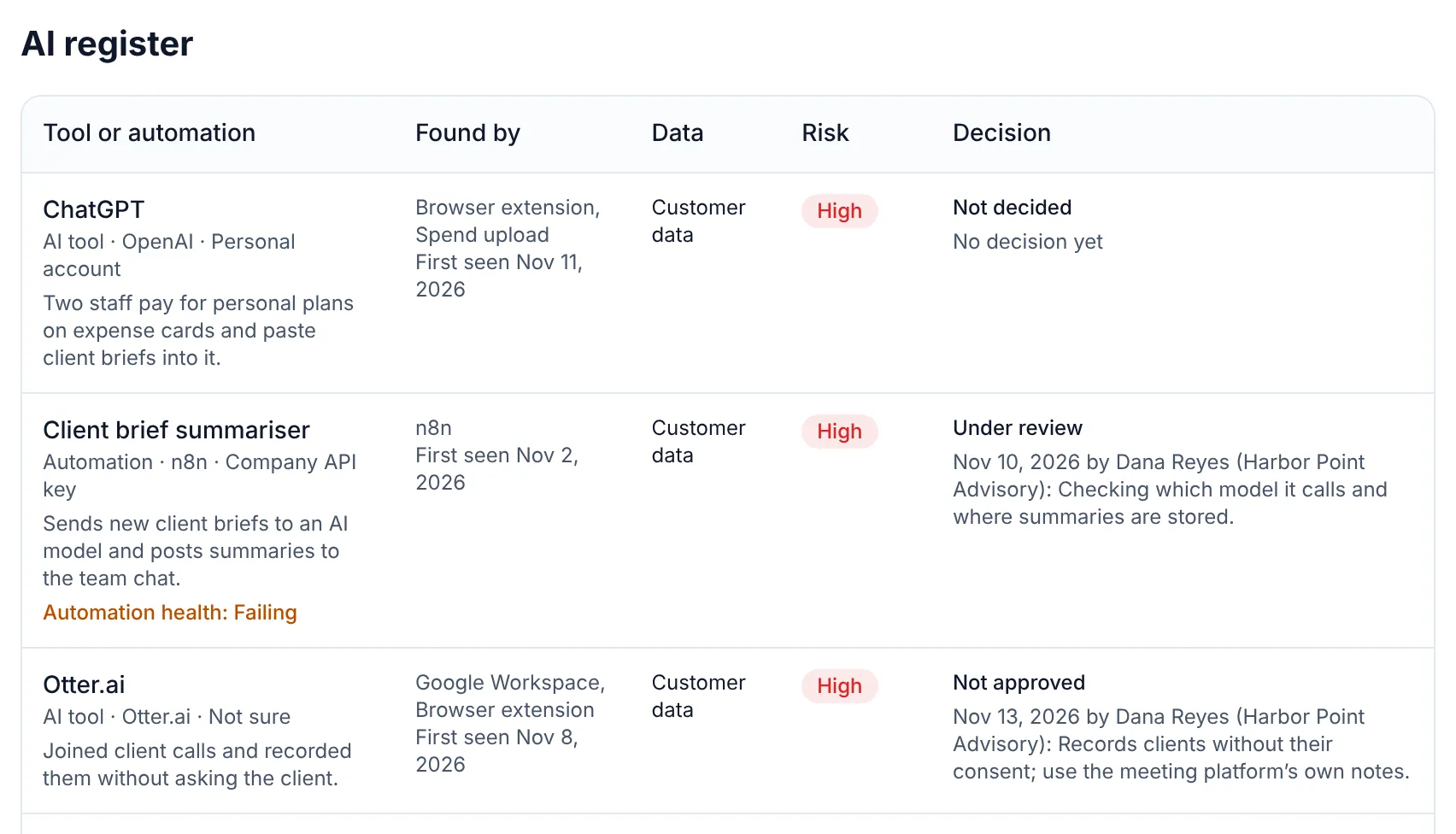
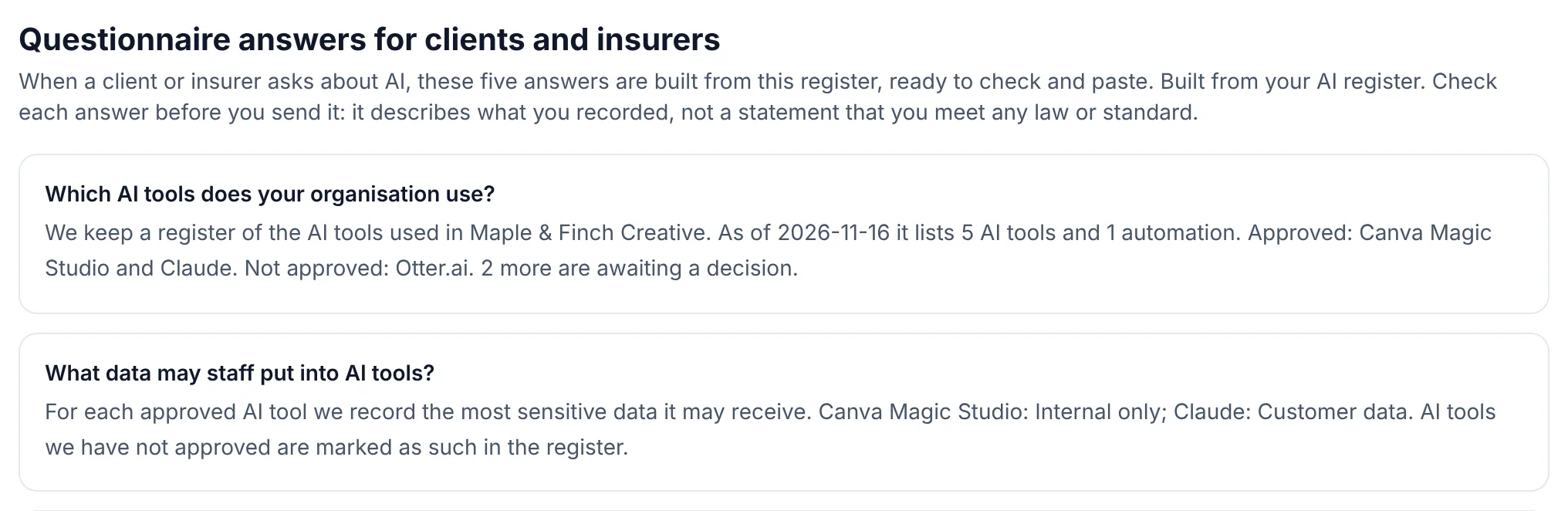
The register and the answers it drafts
These pictures are from the sample workspace with made-up businesses. Our own register is the same product; we do not publish its entries.
Try it
Click through the same five steps
A guided demo with a made-up consultant and two made-up clients. It stays on this page; press Start and click along.
Maple & Finch Creative · AI register
Find, decide, apply, watch, prove
The steps we ran on our own business, in a sample workspace.
Stays on this page. Made-up businesses and numbers. Nothing you click is sent or saved.
Find out what your own number is
Ours went from 4 to 19. Start with the free list, or watch the demo first.