For mid-size businesses

Every department picked its own AI. Bring it into one register.

TechEd Analyst finds the AI tools and automations across your teams, routes each one to a named reviewer, applies the decision where people work, and keeps a history that shows later edits.

Sample workspace · made-up data
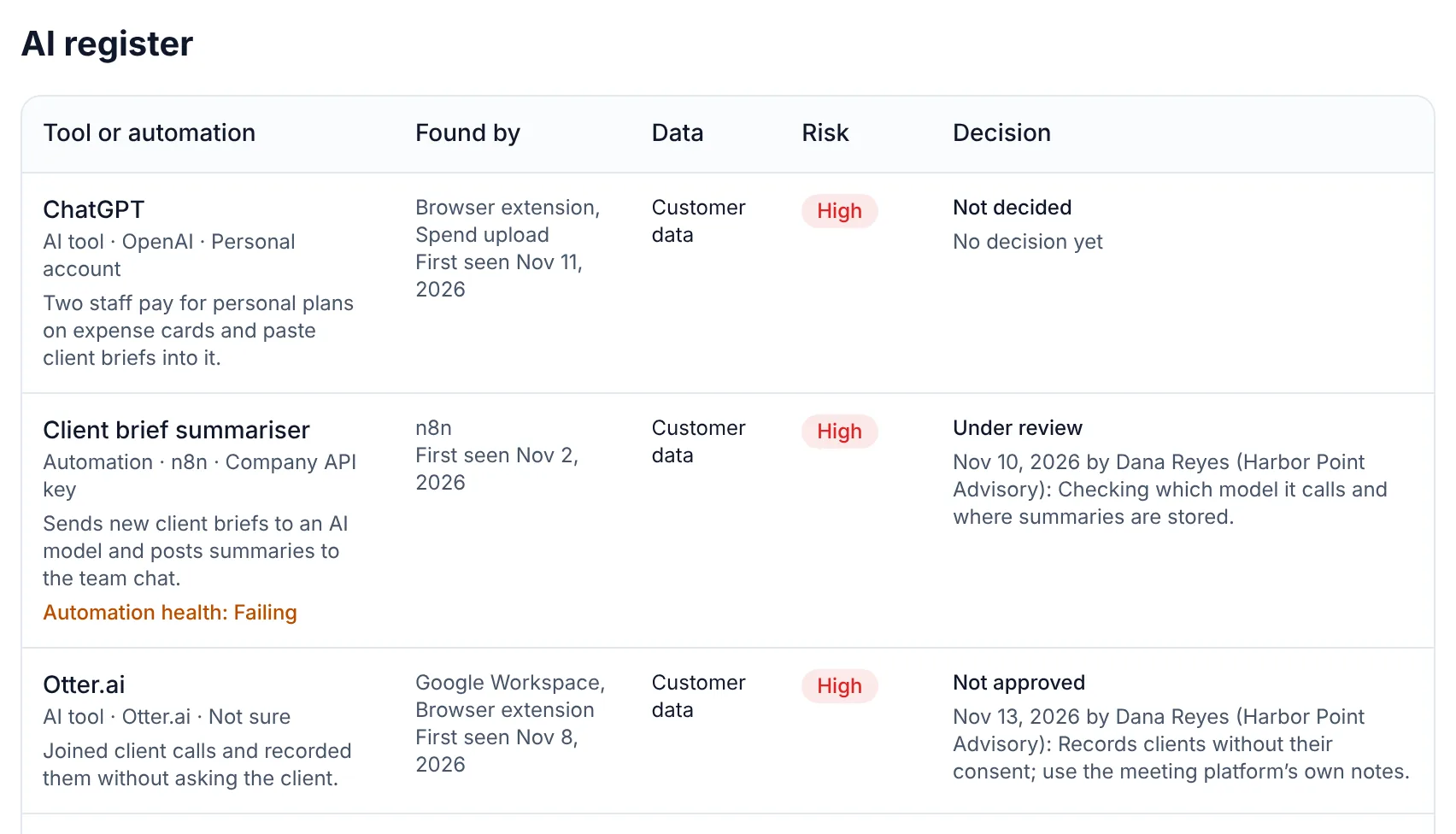
The AI register in the sample workspace: ChatGPT not decided, a client brief summariser under review, Otter.ai not approved and Midjourney not decided, each with how it was found, the data it touches and its risk.
The register in the sample workspace: how each tool was found, the data it touches, its risk and its decision.

The problem

It rarely starts as a decision.

  1. 1

    Each team chose its own tools

    Marketing has a writing assistant, sales has a notetaker, finance is trying a forecasting add-on. Each was a reasonable choice inside one team.

    Nobody holds the whole list, so the same question gets a different answer in every department.
  2. 2

    The questionnaires got longer

    Larger customers and your insurer now ask which AI tools touch their data, who approved each one and when it was last looked at.

    IT answers from memory, legal asks for proof, and the reply takes weeks.

  3. 3

    People leave, access stays

    Someone who signed a work account into five AI tools moved on last quarter. Their account was closed; the tools were never looked at.

    Access granted once keeps working until someone goes looking for it.

  • 47%

    of AI users use personal AI apps, down from 78% a year earlier.

    Netskope Cloud and Threat Report, 2026

    What we do about it. TechEd Analyst lists the AI tools in use and tells staff, in the browser, when an approved tool is open on a personal account.

  • 77%

    of employees paste data into generative AI tools.

    The Hacker News, on an enterprise AI and SaaS data security report, 2025

    What we do about it. Pasted and typed text is checked for card numbers, keys and client details, and a warning appears before it is sent. The checks run in the browser, on the computer, and the text is not sent to TechEd Analyst.

  • 41%

    of employees find a way around AI apps their company blocks.

    UpGuard, State of Shadow AI, 2025

    What we do about it. Approve the tools people need, with limits on the data, and give staff a request link with a 72-hour answer.

What it costs you

The cost is not the tool. It is not knowing.

  • Departments pay for overlapping AI subscriptions on separate cards, with no one comparing them.

  • A customer’s security review stalls while someone works out which AI tools are in use.

  • When approval lives in a chat thread, nobody can say who said yes, or to what.

  • Every request goes to one inbox, so staff stop asking and start signing up.

Before and after

The same questions, with an answer.

  • Which AI does each department use?

    Today: A spreadsheet per team, each out of date.

    With TechEd Analyst: One register from Google Workspace, Microsoft 365, your sign-in provider, card exports and a staff request link.

  • Who decides?

    Today: Whoever is asked first.

    With TechEd Analyst: Register managers decide, a named reviewer is recorded, and the owner approves the policy.

  • What about people who have left?

    Today: Their AI sign-ins are never checked.

    With TechEd Analyst: The former-staff check lists AI access still tied to closed accounts.

  • What do we give an outside reviewer or a customer?

    Today: Screenshots and an email thread.

    With TechEd Analyst: A read-only reviewer seat, an export with its evidence and a history that shows later edits.

How it fits together

From where AI shows up to the record you can show

Five stages, one register. Each decision is made once and used everywhere after it.

1

Where AI shows up

  • Google Workspace
  • Microsoft 365
  • Card and expense exports
  • Staff requests
  • n8n and Make automations

2

One register

  • Every AI tool, agent and automation
  • Account type and the data it touches
  • A risk level with its reasons

3

Decided once

  • Approve, or approve with limits
  • Not approve
  • An owner and a date to look again

4

Applied at work

  • Reminders and stops in the browser
  • Client details removed from pastes
  • Alerts when an automation breaks

5

The record you show

  • Monthly report with sign-off
  • AI use policy, drafted
  • Questionnaire answers
1. Where AI shows up: Google Workspace, Microsoft 365, Card and expense exports, Staff requests, n8n and Make automations. 2. One register: Every AI tool, agent and automation, Account type and the data it touches, A risk level with its reasons. 3. Decided once: Approve, or approve with limits, Not approve, An owner and a date to look again. 4. Applied at work: Reminders and stops in the browser, Client details removed from pastes, Alerts when an automation breaks. 5. The record you show: Monthly report with sign-off, AI use policy, drafted, Questionnaire answers.

How TechEd Analyst handles it

Four steps, one register.

  1. Step 1

    Find it across every team

    Connect Google Workspace or Microsoft 365 and your sign-in provider, upload card exports, and share one request link. Each adds what it sees to the same register. Nothing is changed in the accounts you connect.

    Discovery in depth
  2. Step 2

    Share the deciding, keep the record

    Give register managers the day-to-day decisions and name a reviewer for the tools that touch sensitive data. Every decision keeps who, when and why, and comes back when its date is due.

    Decisions in depth
  3. Step 3

    Apply it on company computers

    The browser extension points staff from a tool that was not approved to the one that was, and checks pastes on the device before anything is sent.

    Browser controls in depth
  4. Step 4

    Show it to people outside the team

    A monthly report with sign-off, six-month trends for leadership, an export with its evidence and a read-only seat for an outside reviewer.

    Evidence and reporting in depth

Why TechEd Analyst stands out

A record you can show, without watching your staff.

Enterprise tools look at AI from the security team’s chair. TechEd Analyst gives small businesses, and the consultants and MSPs who look after them, the whole loop (find it, decide it, apply it, watch it, prove it) at a flat price, without sending staff text to anyone.
  • Available

    A record, not just a list

    Finding AI is the start. Every tool and automation gets a decision, an owner, a reason and a date to look again, and the report and client answers are drawn from that record.

    See how it works
  • Early access

    What staff type stays on their computer

    Paste and typing checks run in the browser on the device. TechEd Analyst receives counts, never the text, so there is less to hold and less to lose.

    See how it works
  • Available

    It suggests. You decide.

    The register suggests which app access to remove. Nothing is removed until an owner confirms, one item at a time, and every decision is logged with who made it.

    See how it works
  • Available

    AI tools and automations in one place

    Automations that send data to AI sit beside the AI tools, with an owner and an alert when one fails or goes quiet. One register, not two products.

    See how it works
  • Available

    Neutral about the AI you choose

    TechEd Analyst is not an AI assistant and does not resell one. It records what you use across Google and Microsoft, whichever tools your team picks.

    See how it works
  • Flat plans, no per-seat charges

    Plans are priced by the size of the business, not by the number of people using them. Adding a colleague doesn’t add a line to the bill.

    See how it works

What you hand over

A report leadership can read

Each month: what is in the register, what was decided and by whom, what the browser applied and which automations need attention. Print it, save it as PDF, or hand it to a customer’s reviewer.

Open the sample report
Sample workspace · made-up data
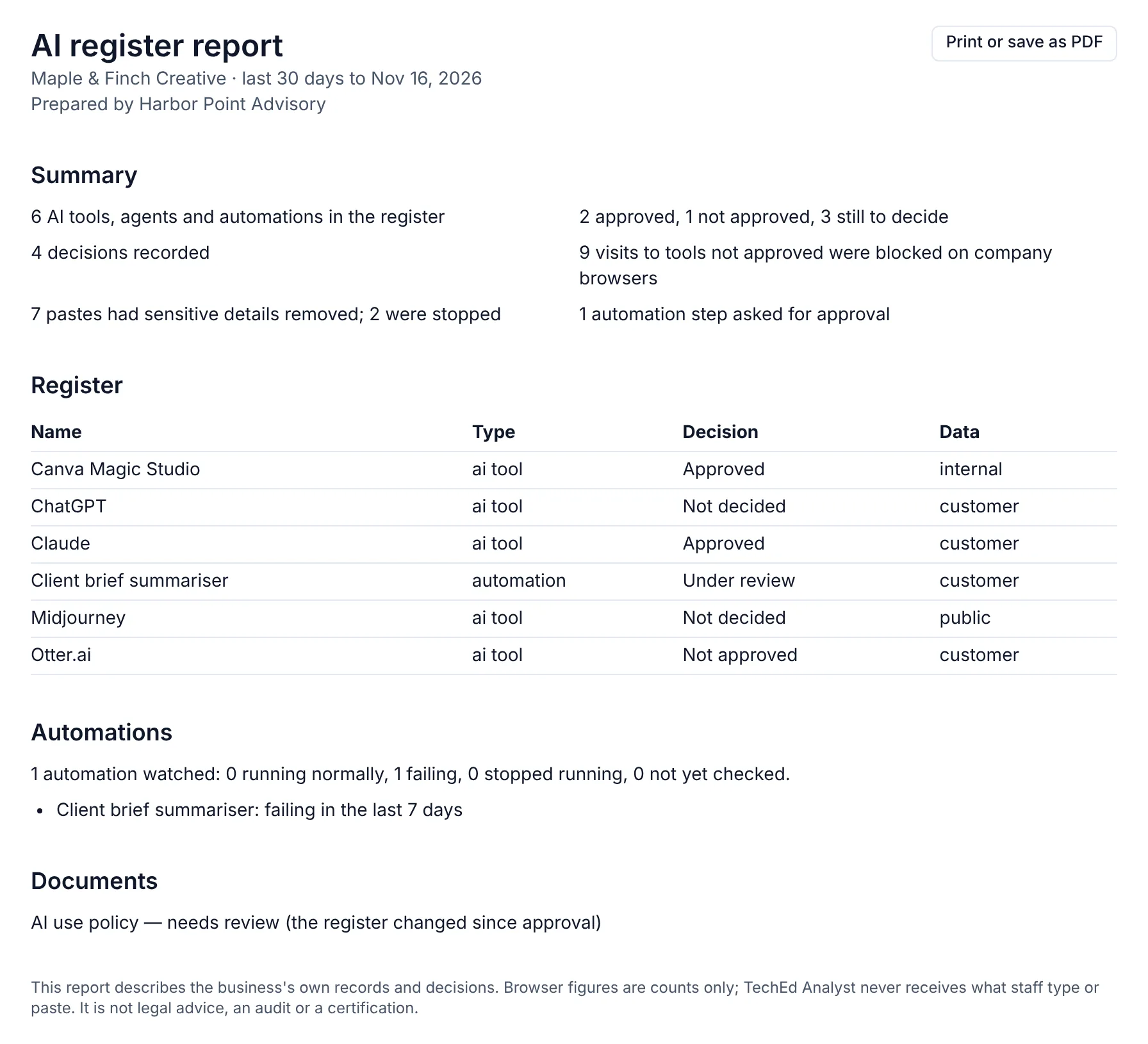
A monthly AI register report for the sample client Maple & Finch Creative, prepared by Harbor Point Advisory: a summary of decisions and browser counts, the register, automation health and documents needing review.
A monthly report from the sample workspace, prepared by the consultant: made-up businesses, the product’s own report.

Try it

Where does your business stand?

Eight yes-or-no questions about your AI use. You get a one-page summary of what is in place and what is open, with a next step for each. Runs in your browser; nothing is sent.

  1. 1. Do you have one list of the AI tools your team uses?
  2. 2. Do you know which staff use personal AI accounts for work?
  3. 3. Is there a written decision for each AI tool, with an owner?
  4. 4. Do staff know which kinds of data may go into each tool?
  5. 5. Can staff ask for a new AI tool and get an answer within days?
  6. 6. Is anything in place to warn someone before client or payment details are pasted into an AI tool?
  7. 7. Do you know which automations and AI agents run in your business, and who owns each?
  8. 8. Could you send a client or insurer a current record of your AI use this week?

Your summary

8 questions left to answer.

This is a self-check for your own planning. It is not advice, and it does not say what rules apply to your business.

See it in the product

See what the register finds

A guided demo with a made-up consultant and two made-up clients. It stays on this page; press Start and click along.

Maple & Finch Creative · AI register

Sample data

See what the register finds

Open a made-up business’s register, look at what was found and how, then decide on a tool and see it applied.

Stays on this page. Made-up businesses and numbers. Nothing you click is sent or saved.

In depth

Every feature that matters here

Each one is built and tested. The label says whether it is switched on in the product today.

  • Register and decision log

    Available

    Every tool has a status, an owner and a log of who decided what, and when.

  • Register manager role

    Available

    Your staff run client registers while the client owner keeps policy approval.

  • Read-only reviewer role

    Available

    A client’s outside reviewer can read the register and cannot change it.

  • Named reviewer and notes

    Available

    A second person reviews a decision and leaves notes that stay with the entry.

  • Microsoft 365 app access check

    Available

    Checks whether staff can approve apps on their own and whether they can ask an admin, and shows the exact setting to change.

  • License consolidation

    Available

    From your own statement, AI subscriptions that look like several separate plans for one vendor.

  • Six-month trends

    Available

    How the number of tools, decisions and open items has moved.

  • History that shows later edits

    Available

    Each change is chained to the one before, so an edit after the fact is visible.

  • Export with evidence

    Available

    Download the full register with its decisions and evidence links.

  • Company sign-in (SSO)

    Early access

    Your team signs in with your identity provider.

  • Okta source

    Early access

    Reads the app list from Okta for businesses that sign in through it.

  • Former-staff access

    Early access

    Shows AI apps still connected for accounts that have been disabled.

  • Decide once, applied in browsers

    Early access

    Each decision becomes allow, show a notice or block on that tool’s site.

  • Slack and Teams alerts

    Early access

    Sends alerts to the channel your team already reads.

  • Read-only API

    Early access

    Read register data from your own tools.

  • Staff policy acknowledgment

    Early access

    Staff confirm they have read the AI use policy, and you see who has.

Available: switched on in the product today. Early access: built, and either switched off until it has been reviewed or waiting on a browser store listing. Labels checked on 2026-11-14.

Questions

TechEd Analyst keeps a record of what you use and decide, and drafts documents for you to check. It does not give legal advice or decide which laws apply to your business.

Who TechEd Analyst is for

Want this for your business or your clients?